Key takeaways
- Roll Sales Tax Payable forward from the reports and the bank, not the ledger: opening balance + tax charged − tax refunded − tax paid − discount kept. Compare the result with the books. Then check that it equals the tax on returns not yet paid.
- A difference usually equals one amount you already have. In our example the books are $165.00 high, exactly the tax Amazon collected on $2,000 of sales. So match the size first, then look for the entry.
- The timely-filing discount is income, not a smaller liability. The IRS says to include any sales tax the state lets you keep as income on Schedule C line 6. Several states changed their discount in 2025 and 2026.
- States disagree on marketplace sales. Texas wants them in total sales but not in taxable sales, and Florida and Illinois leave them off. They also disagree on cash or accrual: California requires accrual, and Texas allows cash basis by election.
- Of the states we checked, only Hawaii (G-49) and Michigan (5081) add an annual return on top of the periodic ones. Rhode Island dropped its annual reconciliation from tax year 2023.
What is sales tax reconciliation?
In short: It's the check that four numbers agree: the tax charged to customers, the Sales Tax Payable balance, the tax on the return, and the payment to the state. When they do, what's left in the account is exactly the tax on returns not yet paid.
Each of the four numbers you compare comes from a different place, and each can go wrong on its own. The sales system can charge the wrong rate. An integration can post tax that isn't the client's, which is where the $165.00 in this guide's example comes from.
Someone can also code a payment to an expense, or prepare a return from the wrong report. A reconciliation catches these while they're still small, and it leaves you a workpaper that shows how the return was prepared.
- Charged to customers$4,042.50Sales tax report: $4,125.00 charged − $82.50 refunded
- In the books$4,207.50Sales Tax Payable at March 31
- On the return$4,042.50March return, due April 20
- Paid to the state$4,022.29April 20: the return less the 0.5% discount ($20.21)
Two different things share the name. Most of the time it means the check above, done each time the client files. A few states also require an annual reconciliation return, a separate form for the whole year, covered below.
How do you reconcile sales tax payable?
In short: Start from last period's balance, add the tax charged, and subtract the tax refunded, paid, and kept as a discount. Compare the result with the books, then check that it equals the returns not yet paid.
Say you keep the books for Maple & Pine Home Goods, a home goods store in Texas that files monthly. The business is fictional, and 8.25% is an example rate: Texas has a 6.25% state rate and up to 2% in local tax.
You reconcile March 2026 before you prepare the March return. You need three documents: the store's sales tax report, the bank statement, and the February return.
- Take the opening balance from the books: Sales Tax Payable on the last day of the previous period. It's the only number from the ledger, so check it against the balance you reconciled last time.
- Add the tax charged to customers, from the sales system's tax report. Leave out sales where a marketplace collected the tax.
- Subtract the tax refunded on returns and credit memos.
- Subtract what the client paid the state during the period, from the bank statement. Leave out any penalty or interest.
- Subtract any timely-filing discount kept on that payment.
- Compare the result with Sales Tax Payable in the books on the last day of the period.
- Check that the result equals the tax on returns not yet paid at the end of the period.
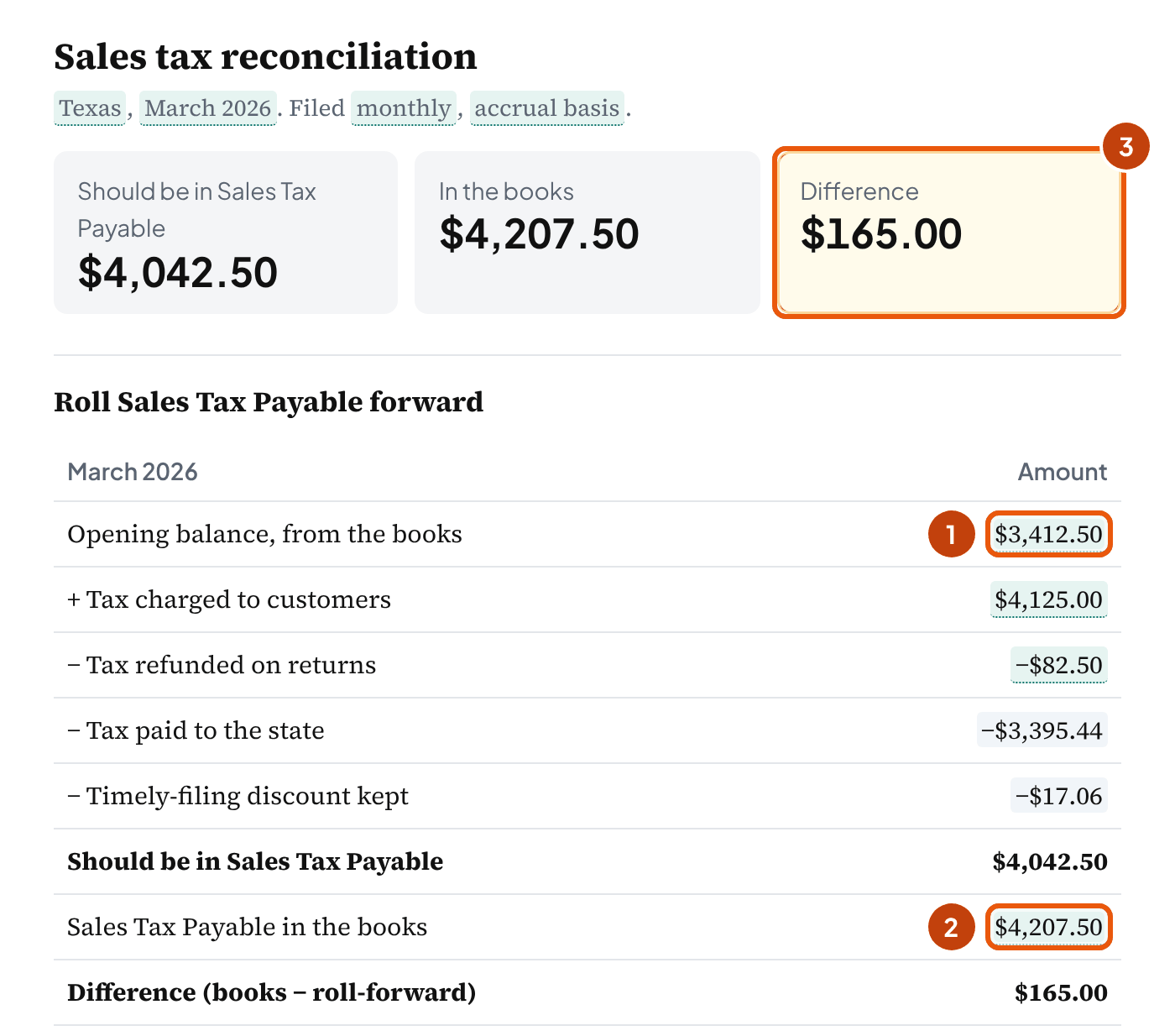
| Opening balance, February 28 (the February return, not yet paid) | $3,412.50 |
| Tax charged: $50,000 of taxable sales × 8.25% | + $4,125.00 |
| Tax refunded: $1,000 of returns × 8.25% | − $82.50 |
| February return paid March 20: $3,412.50 − $17.06 | − $3,395.44 |
| 0.5% timely-filing discount: $3,412.50 × 0.5% | − $17.06 |
| Should be in Sales Tax Payable on March 31 | $4,042.50 |
| Sales Tax Payable in the books | $4,207.50 |
| Difference | $165.00 |
The roll-forward says $4,042.50 and the books say $4,207.50, so $165.00 needs explaining before the March return goes in.
The proof: what should be left
The roll-forward tells you what the account should hold, but not whether that amount is right. The proof does.
At the end of a period, only one thing belongs in Sales Tax Payable: the tax on returns that haven't been paid yet. For a monthly filer that's usually one return, the one for the month you closed. On a cash basis, tax on invoices the customers haven't paid stays there too, until they pay (below).
Maple & Pine's March return shows $49,000 of taxable sales and $4,042.50 of tax, due April 20, 2026. That matches the roll-forward. So once the $165.00 is explained, nothing else is left in the account. The other balance sheet accounts get the same treatment in the balance sheet reconciliation template.
Why build the roll-forward from the reports and the bank instead of the ledger? Because the ledger is what you're testing. If an integration posted the wrong amount, adding up the ledger repeats the mistake. Adding up the reports doesn't.
It also lets you check the software's sales tax report from outside: the tool multiplies taxable sales by the rate and compares the result with the tax charged. Several posters in the r/Bookkeeping and r/QuickBooks posts we read had stopped trusting that report. Their tax rates had gone missing, or the report showed less tax than taxable sales × the rate.
Bookkeeper tip: Reconcile before you prepare the return, not after. The difference then gets fixed on the return it belongs to, and the return comes from numbers you've already tied out. Enter the period in the tool above, and it does the arithmetic as you type.
Why doesn't Sales Tax Payable match the return?
In short: Because an entry put something in Sales Tax Payable that isn't tax the client owes, or left out tax that is. The size of the difference usually points to the cause.
Before you go through the ledger line by line, compare the difference with amounts you already have. The difference is the books minus the roll-forward, so it's negative when the books are lower. Each common cause leaves a difference of a known size:
| The difference equals | Likely cause | Fix |
|---|---|---|
| Tax the marketplace collected | A sales or payout integration recorded the marketplace's tax in Sales Tax Payable | Move it out of the liability (entry below) |
| The payment to the state | The payment was coded to an expense such as "Taxes and licenses" | Reclassify the payment to Sales Tax Payable; profit was understated by the same amount |
| The discount | The payment cleared only the cash paid, and the discount stayed in the account | Move the discount to other income |
| Minus the penalty | Penalty or interest was posted against the liability | Move it to an expense account |
| Tax refunded | Refunds reversed the sale but not its tax | Record the tax on the refunds |
| Minus the payment | The payment was recorded twice, from the bank feed and by hand | Delete the duplicate |
| None of these | Several smaller causes, or a timing difference | Go through the period's entries to the account one by one |
Maple & Pine's $165.00 is 8.25% of the $2,000 the store sold on Amazon in March. Amazon's tax report shows that Amazon collected that tax. But the store's Amazon integration had also recorded it in Sales Tax Payable, along with the sales.
In Texas, once a marketplace certifies that it collects, collecting the tax is the marketplace's job. So the $165.00 isn't the store's to pay. Left in the account, it overstates the liability, and a return prepared from the ledger would include tax Amazon has already paid.
| Account | Debit | Credit |
|---|---|---|
| Sales Tax Payable | $165.00 | |
| Amazon clearing account | $165.00 |
The credit side depends on how the integration recorded the sale. Open the original entry before you post this; ours assumes the payouts run through a clearing account.
The tool's journal entries include the correcting entry for six of these causes: the marketplace's tax, the discount, the penalty, a payment coded to an expense, a payment recorded twice, and the refunded tax. A mix of causes you'll need to trace yourself.
Then tell the client what moved and why, so the change isn't a surprise on the next report:
Telling the client
March's Sales Tax Payable was $165.00 higher than the tax you owe. That's the tax Amazon collected on your Amazon sales, and Amazon pays it to the state. So I've moved it out of the account. Your March return shows $4,042.50.
What if no single amount matches? The same posts point to a few more places to check. Treat them as things to rule out, not causes you can read from the size:
- an invoice edited or voided after its return was filed, so the books changed and the return didn't
- a credit memo or refund taxed at the business's own address instead of the customer's (one practitioner found credit memos defaulting that way)
- transactions entered while the software's tax rates were missing or wrong, so recheck the tax on that date range
- a payable near zero although tax was charged all period: the tax may have been recorded in sales and the payments as an expense
The last one isn't always a mistake. Some practitioners record it that way on purpose, so ask the client's tax preparer before you call it an error. When the books show $0.00 and the roll-forward expects a balance, the tool says so and suggests no entry.
One check catches most of these. Recompute the tax from taxable sales × the rate, then compare it with the software's tax report and with Sales Tax Payable.
The tool does that for one combined rate, or for each jurisdiction. Under 3. From the sales tax reports (store and marketplace), add a row for each jurisdiction on the return (the state, a county, a city, a district) with its taxable sales, rate, tax charged and tax on the return.
Each row's taxable sales × rate is checked against its tax charged. Leave Tax charged blank and the tool uses the rows' total in the roll-forward. The import can fill the table from a report too, with one total for each value of a column, such as the jurisdiction name.
When it's a timing difference
Some differences aren't errors but timing. A sale invoiced on March 31 and recorded in April moves tax into the next period. So does a refund issued in one month for a sale in another, or a payment that clears the bank a day after month end.
Write the timing difference into the workpaper with the date it reverses, and check next month that it did. On a cash basis, tax on unpaid invoices is a timing difference too, covered below.
| Risky | Safer |
|---|---|
| Plugging the difference to sales or an expense so the account ties | Leaving it open in the workpaper until the cause is found |
| Booking the payment as "sales tax expense" | Debiting Sales Tax Payable with the payment |
| Letting the marketplace integration post tax to the liability | Mapping marketplace tax to the clearing account, not Sales Tax Payable |
| Preparing the return from the ledger balance | Preparing it from the sales reports you've tied to the ledger |
If the client uses QuickBooks Online
Many of the causes posters describe are QuickBooks ones. A sales tax payment was written as an ordinary check, a discount stayed in the account, or an invoice was edited after filing.
Intuit's help page on sales tax payments (updated September 11, 2026) gives the route for the first two.
Record the payment from the sales tax screen: All apps, then Sales Tax, then Overview. Select the tax agency in the Sales Tax Owed list and select Record Tax Payment. Then enter the bank account, the payment date and the amount.
Posters often call this step Pay Sales Tax. A payment entered as an ordinary check to an expense account is the "payment to the state" row in the table above.
For the discount, Intuit says to select Make Adjustment when you record the payment. Its rule for the account is "Credit or applying a discount: Select an income account, such as Other Income".
Fines, penalties and interest go to an expense account. A rounding adjustment goes to an income account when the difference is negative and to an expense account when it's positive. For all of them, Intuit says: "Don't select the sales tax Payable account".
If the agency still shows a balance after a payment, compare it with the discount. For Maple & Pine's February return, $3,412.50 owed less $3,395.44 paid leaves $17.06, which is the Texas discount. Intuit's route is to add it with Make Adjustment when you record the payment, not as a second payment.
How do you record the timely-filing discount?
In short: As income. The payment clears the full tax on the return, and the part the state lets the client keep goes to other income.
States give it different names. Louisiana and Georgia call it vendor's compensation, Florida and Nevada a collection allowance, Virginia a dealer discount, and Illinois a retailers' discount. The booking is the same.
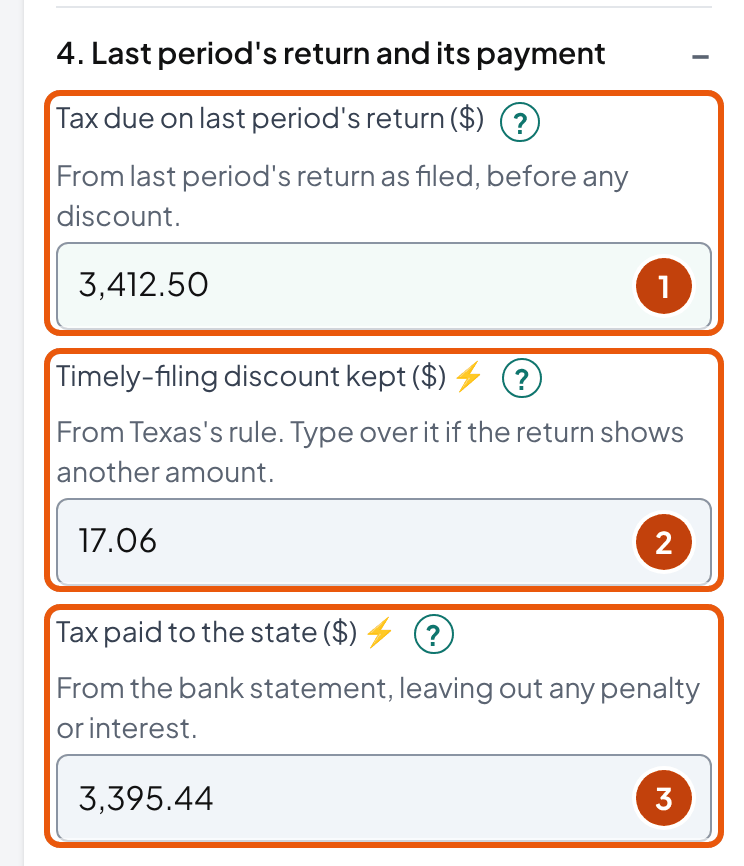
Texas allows a 0.5% discount for filing and paying on time. On Maple & Pine's February return of $3,412.50 that's $17.06, so the store paid $3,395.44. The full $3,412.50 comes off Sales Tax Payable, because that's what was owed.
The IRS Schedule C instructions are direct about the rest. They say "if the state or local government allowed you to retain any part of the sales tax you collected, you must include that amount as income on line 6".
| Account | Debit | Credit |
|---|---|---|
| Sales Tax Payable | $3,412.50 | |
| Checking | $3,395.44 | |
| Other income: sales tax timely-filing discount | $17.06 |
The tool applies the Texas 0.5% to the tax due on the return. The Comptroller's page confirms the rate but doesn't show the computation, so check it against the line on your client's return. Texas also has a separate 1.25% discount for prepaying, which the tool doesn't calculate. In QuickBooks Online, the discount goes in with Make Adjustment (above).
What changed in 2025 and 2026
Reusing last year's workpaper? Check these first. Each comes from the state's bulletin, form, or law:
| State | Change | From |
|---|---|---|
| Illinois | 1.75% now capped at $1,000 for each month a return covers | Returns due January 1, 2025 |
| Louisiana | 1.05% applies to part of the state tax only (about 0.84%), capped at $750 a month per dealer (was $1,500) | Periods from January 1, 2025 |
| Ohio | 0.75% now capped at $750 per vendor's license for each month covered | Returns due January 1, 2026 |
| Colorado | No state service fee (was 4%, up to $1,000 a period); local fees may still apply | January 1, 2026 |
| South Dakota | Collection allowance suspended (from the enrolled 2025 bill; we didn't see the signed copy) | July 1, 2025 to June 30, 2028 |
The tool has a rule for 45 states and DC. Each rule carries its source and how firmly we could confirm it. For 15 of them, DC included, we found no discount on the current return or instructions. No state text says "none" outright, so check the discount line on the client's return.
For a few others, the tool asks you to enter the discount from the return. Either we couldn't confirm the rate at the state, or the discount depends on figures the tool doesn't ask for (Virginia's depends on monthly taxable sales).
The full table, with each state's source, status and rule, is on the sales tax discounts by state dataset page. You can download it there as a CSV.
How do marketplace sales affect the reconciliation?
In short: The marketplace collects and pays the tax, so that tax stays out of the client's Sales Tax Payable. The sales still count, but each state wants them shown differently on the seller's own return.
A GAO report (GAO-23-105359) found that, as of June 2021, every state with a sales tax except Oklahoma required marketplaces to collect. Oklahoma let them choose to report the sales instead. The Streamlined Sales Tax Governing Board's page now lists Oklahoma as requiring collection, so check the current rule there.
What varies is the seller's return:
| State | Marketplace sales on the seller's return |
|---|---|
| Texas | Include them in Item 1, Total Texas Sales; leave them out of Item 2, Taxable Sales |
| California | Include them in total sales, then deduct them as "other" |
| Washington | Report them in gross sales under Retailing B&O, then take the "Gross Sales Collected by Facilitator" deduction |
| New York | Include them in gross sales and services, and in nontaxable sales |
| Florida | Leave them off the return, when the marketplace has certified that it collects |
| Illinois | Leave them off Form ST-1; don't include them and then deduct them |
| Michigan | Don't report them on Line 1A of the annual Form 5081 |
For Maple & Pine that means a March return with $51,000 of total sales and $49,000 of taxable sales. The $51,000 is $49,000 from the store after returns, plus $2,000 on Amazon. In Florida, the same store would report $49,000 in both.
Reading Amazon's tax report
Amazon's US Sales Tax Report is a tab-separated file you generate from the Tax Document Library in Seller Central. Its columns include Tax_Collection_Responsible_Party, Taxable_Amount, Tax_Amount, Jurisdiction_Level, and Total_Tax_Collected_By_Amazon.
Check two things before you add it up. First, the Jurisdiction_Level column suggests one row for each level (state, county, city). So see whether the taxable amount repeats before you total it. That's our reading rather than Amazon's wording.
Second, some guides name columns that aren't in Amazon's documentation: there's no "Tax_Rate", and the rate column is Taxed_Jurisdiction_Tax_Rate.
In the tool, open 3. From the sales tax reports (store and marketplace) and use the import. It reads the file in your browser, adds up the column you pick, and can filter by any column, such as Tax_Collection_Responsible_Party.
Form 1099-K: third-party payment platforms (marketplaces and payment apps) report a seller's sales on this form. They report when the year has more than $20,000 and more than 200 transactions. That threshold is in force again for 2025 and 2026. The IRS defines the amount as the gross total "without regard to any adjustments for credits, cash equivalents, discount amounts, fees, refunded amounts, or any other amounts".
IRS Publication 334 adds that the 1099-K amount "may include items that are not included in your receipts (such as sales tax)". So when you compare a 1099-K with the books, check whether tax is in its total before you treat a gap as missing sales.
Is sales tax due when you sell or when the customer pays?
In short: The state decides, not the books. Several states make the tax due when the sale is made, even for a client whose books are on a cash basis.
| State | When tax on a credit sale is reported | Bad debts |
|---|---|---|
| California | Accrual for every retailer (Reg. 1642) | Deduct on the return, under "Bad Debt Losses on Taxable Sales", in the period the account is written off for income tax |
| New York | In the period of the sale, "whether or not any money was collected" | Credit or refund within 3 years of when the tax was payable (Schedule CW with the return) |
| Florida | "At the moment of the transaction" | Credit or refund within 12 months after the month of the federal charge-off |
| Texas | On the basis of the books; an accrual-basis retailer may elect cash basis for sales tax, going forward | Credit on the return or a refund, within 4 years of the federal charge-off |
Say Maple & Pine invoices a business customer for $10,000 of furniture on March 28 and gets paid in May. On an accrual basis, the $825 of tax goes on the March return. If the store had elected cash basis for sales tax, it would go on the May return instead.
A $10,000 invoice on March 28, paid in May: $825.00 of tax
Accrual
- MarchOn the March return ($825.00)
- AprilNothing left in Sales Tax Payable
- MayCustomer pays; nothing to report
Cash basis (elected)
- MarchStays in Sales Tax Payable as tax on an unpaid invoice
- AprilStill there at April 30
- MayOn the May return when the customer pays
The same invoice in California would be on the March return either way, so your reconciliation would start from invoices, not deposits. Mark the basis on the workpaper, so the next person doesn't "fix" a difference that's only timing.
On a cash basis, choose Cash under 1. State and period in the tool. A field appears under 5 for the tax on invoices not yet paid at the end of the period, from the open invoices or A/R aging report, and the proof adds it to the return.
Say the $10,000 invoice was part of Maple & Pine's $50,000 of March sales. On a cash basis, the March return would show $4,042.50 − $825.00 = $3,217.50. The proof is then $3,217.50 + $825.00 = $4,042.50, the same as the roll-forward.
Which states require an annual sales tax reconciliation?
In short: Of the states we checked, Hawaii and Michigan, each on top of the monthly or quarterly returns. Rhode Island dropped its annual reconciliation from tax year 2023.
| State | Annual return | Due | What we found on penalties |
|---|---|---|---|
| Hawaii | Form G-49, annual return and reconciliation (general excise tax), filed by all filers | 20th day of the 4th month after the tax year (April 20 for a calendar year) | The general late-filing penalty: 5% a month, up to 25% of the tax due |
| Michigan | Form 5081, annual return; "Do not use this form to replace a monthly/quarterly return" | February 28 (for 2025: February 28, 2026) | With no tax due, $10 a day up to $400; with tax due, 5% plus 5% a month after the second month, up to 25%, plus interest |
| Rhode Island | RI-STR-Annual "no longer required for Tax Year 2023 and forward". Liquor stores (T-204A) and writers, composers, and artists (T-204W) still file one | The 2024 forms say January 31, 2025 | None shown on the forms |
An annual filing frequency is a different thing. Some states assign annual filers (New York's and Utah's discount rules mention them), and that return replaces the monthly or quarterly ones rather than reconciling them. In the other states we checked, we found no extra annual return.
Ohio's law lets the state require a reconciliation return, and we couldn't confirm whether it does. We didn't check North Dakota, South Dakota, Pennsylvania, or Vermont. Connecticut's annual disaggregated report for multi-location filers became quarterly on October 1, 2026, and it carries no tax.
If your monthly reconciliations tie, your twelve workpapers are most of the work for the annual return. Its totals have to match the sum of the year's returns. So add up the tool's Excel files for the year and compare the totals with the annual form.
What do auditors compare in a sales tax audit?
In short: The books against the sales tax returns, and the returns against the income tax return. Your reconciliations are the explanation for any gap.
California's audit publication says the auditor tests "Total sales recorded on your books to the total sales reported on your sales tax returns". It tests the same books against the income tax returns, and the "Amount of tax you collected to the tax reported on your returns".
The Texas Comptroller's audit manual compares reported gross sales with federal income tax returns, franchise tax gross receipts, and financial statements. It lists cash versus accrual reporting as one of the differences to account for.
So keep the year's sales on the returns reconciled to the income tax return, with marketplace sales and timing differences written out.
| State | Keep records | Assessment period | No limit (or longer) when |
|---|---|---|---|
| California | At least 4 years | 3 years | 8 years if no return was filed |
| New York | 3 years from the due date (or filing date, if later) | Generally 3 years | No return filed, or a false or fraudulent return |
| Florida | 3 years | 3 years | Failure to file or pay, or a fraudulent return |
| Texas | At least 4 years | 4 years from the due date | Not confirmed at an official source |
Bookkeeper tip: Keep each period's workpaper with the sales tax report, the marketplace tax report, the bank statement line for the payment, and the return as filed. The tool's Excel download has a sign-off line for the preparer and the reviewer.
How do you fix a mistake on a filed return?
In short: Amend it through the state's system and pay the difference with interest. For periods that were never filed, look at the state's voluntary disclosure program before the state contacts the client.
| State | Amend | Late penalties | Voluntary disclosure |
|---|---|---|---|
| California | In Online Services | 10% for late filing and 10% for late payment, up to 10% a return in all; interest at the IRS rate + 3% | Voluntary disclosure programs with a 3-year lookback |
| New York | Allowed unless it lowers a past-due amount; a self-reported one can be lowered within 180 days | 10% + 1% a month, up to 30%; at least $50 for late filing; interest 14.5% (Q4 2026) | Voluntary Disclosure and Compliance Program |
| Florida | Mark the corrected return "Amended replacement" | 10% or $50, whichever is more, even on a zero return; interest 11% (July–December 2026) | 3-year lookback, penalties waived |
| Texas | Webfile: change only the data that needs amending | $50 a late report; 5% (1–30 days) or 10% (over 30 days), and another 10% after a Notice of Tax Due; interest 7.75% for 2026, from day 61 | 4-year lookback; no limit for tax collected and not paid |
Penalties are the practical reason to reconcile before you file. Florida's minimum applies even to a zero return, and in Texas and New York the percentage grows the longer the balance runs.
Found tax that was collected and never paid? Look at the state's voluntary disclosure program before the state contacts the client. In Texas, for example, the 4-year lookback doesn't apply to that tax, so every period counts.
Penalty and interest are a cost of the business, not tax owed to the state. So book them to an expense account rather than Sales Tax Payable. Whether they're deductible for income tax is a question for the tax preparer.
What if Sales Tax Payable has an old balance nobody can explain?
Don't clear it with one entry. A plug hides which years the balance came from, and the owner and the tax preparer need that to decide what to do.
Posters described balances untouched for years and money left over after years of filings. One CPA listed a sales tax payable that keeps growing with no payments as a red flag in a client's books.
Work forward, year by year, from the last return you know was filed and paid. Roll each period forward as above, tie each return to its bank payment, and list what's left at the end of each year. The list by year is the workpaper you take to the owner.
- Start at the last return you know was filed and paid.
- Roll each period forward from the sales reports and the bank, as in the tool.
- Tie each return to its payment on the bank statement.
- List what's left in Sales Tax Payable at the end of each year.
Then split what's left into two lists
Then split what's left into two kinds, because states treat them differently. Tax collected from customers and never paid goes to the voluntary disclosure question above. In Texas the lookback has no limit for it. Tax that was never charged to customers is a separate question.
A commenter who said they were a former New York sales tax auditor put the line plainly. Collected tax belongs to the state, and keeping it is worse than never collecting it.
Take both lists to the owner and the tax preparer, or a CPA or attorney, before anything is posted. Describe the books, not whoever kept them before you. In one of the threads we read, a commenter put it as: say the books aren't ready, not that the bookkeeper is bad.
Telling the owner
Sales Tax Payable shows a balance that doesn't match any return we can find. I've listed what's left by year, and which part was collected from customers. Before anything is posted, I would like your tax preparer to look at the list with us.
What does each field in the tool mean?
In short: Each entry says where the number comes from and what the tool accepts. The "?" beside a field in the tool links here.
Nothing is required. A blank amount counts as zero, except the three the tool calculates (the discount, the payment and the return's tax) and the closing balance, which the result waits for.
- State
- The state whose return you're reconciling. It sets the discount rule and the marketplace, basis and annual-return notes. For a client that files in several states, run the tool once per state.
- Allowed: 45 states and DC
- Period
- A name for the period, such as March 2026. It labels the workpaper and the result; no calculation uses it.
- Allowed: Up to 40 letters, digits and basic punctuation
- How often the client files
- Monthly, quarterly or annually, as the state assigned. Several discount rules depend on it: New York's credit is for quarterly and annual filers, and Utah's for monthly filers.
- Allowed: Monthly, quarterly or annually
- Basis for sales tax
- Accrual: the return carries the tax on every sale made in the period. Cash: tax on invoices not yet paid stays in Sales Tax Payable, and a field for it appears under 5. The state decides which applies (cash or accrual).
- Allowed: Accrual or cash
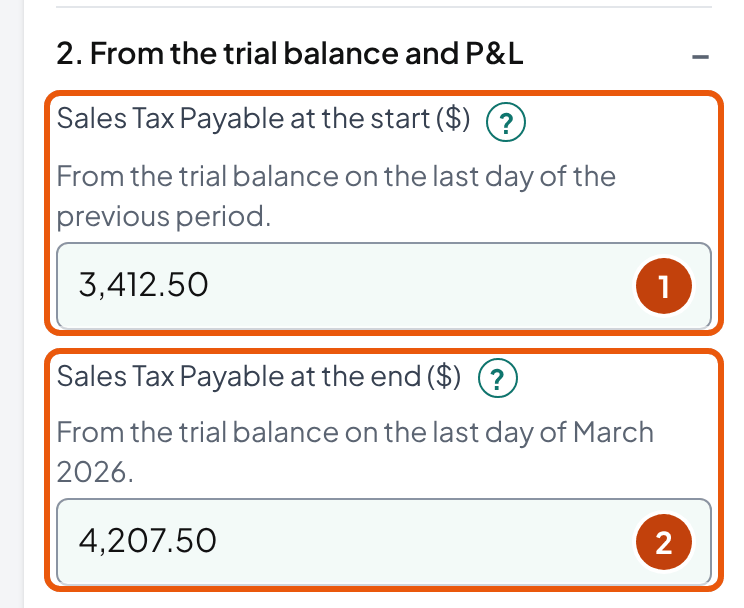
- Sales Tax Payable at the start
- Sales Tax Payable on the trial balance on the last day of the previous period. It matches the balance you reconciled last time unless something changed in a period you'd already closed.
- Allowed: 0 or more
- Sales Tax Payable at the end
- Sales Tax Payable on the trial balance on the last day of the period. The tool compares it with the roll-forward, and the result waits until it's entered.
- Allowed: Any amount; a debit balance is negative
- Sales on the profit and loss
- All sales on the profit and loss for the period, after returns, including marketplace sales. It's compared with total sales on the return.
- Allowed: 0 or more
- Taxable sales
- Taxable sales from the sales system's tax report, before returns, without marketplace sales. With the rate it checks the tax charged; the roll-forward doesn't use it.
- Allowed: 0 or more
- Rate
- The combined state and local rate the sales system charged, as a percentage (8.25 for 8.25%). Only the rate check uses it.
- Allowed: 0 to 20 percent; usually 12 or less
- Tax charged to customers
- From the sales system's tax report for the period, before refunds and without marketplace sales. Left blank, the tool uses the jurisdictions' total.
- Allowed: 0 or more
- Tax refunded on returns
- Tax given back on returns and credit memos, from the same report, entered as a positive amount.
- Allowed: 0 or more
- Marketplace sales
- Sales through a marketplace that collected the tax, from the marketplace's own report. They belong in the books' sales; how they go on the return depends on the state (marketplace sales).
- Allowed: 0 or more
- Tax the marketplace collected
- From the marketplace's tax report: in Amazon's, the Tax_Amount column filtered on Tax_Collection_Responsible_Party. The tool compares the difference with it.
- Allowed: 0 or more
- Split by jurisdiction
- Optional: one row for each jurisdiction on the return, with its taxable sales, rate, tax charged and tax on the return. Each row is checked on its own, and the totals stand in for a blank Tax charged and a blank Tax due on the return.
- Allowed: Up to 40 rows; amounts 0 or more
- Tax due on last period's return
- The tax due on last period's return as filed, before any discount. The payment for it went out during this period.
- Allowed: 0 or more
- Timely-filing discount kept
- The discount kept on that payment. The tool calculates it from the state's rule where it can; otherwise enter it from the return (the discount).
- Allowed: 0 or more
- Tax paid to the state
- What the bank statement shows was paid for that return, without penalty or interest. Left blank, the tool uses the tax due minus the discount.
- Allowed: 0 or more
- Penalty and interest paid
- Penalty and interest paid to the state during the period. The journal entries book them to an expense, not Sales Tax Payable.
- Allowed: 0 or more
- Other entries to Sales Tax Payable
- Entries to the account you already know about that the lines above don't cover, such as a correction posted during the period. Positive adds to the balance.
- Allowed: Any amount, negative allowed
- Total sales on the return
- Total sales on this period's return, once you've prepared it.
- Allowed: 0 or more
- Taxable sales on the return
- Taxable sales on this period's return. Times the rate, it gives the return's tax when the two agree.
- Allowed: 0 or more
- Tax due on the return
- Tax due on this period's return, before any discount. Left blank, the tool uses tax charged minus tax refunded, or the jurisdictions' total when every row has its return figure.
- Allowed: 0 or more
- Tax on other returns filed but not paid
- Tax on other returns filed by the end of the period and paid after it.
- Allowed: 0 or more
- Tax on invoices not yet paid
- Cash basis only: the tax on invoices issued but not yet paid at the end of the period, from the open invoices or A/R aging report. The proof adds it to the return.
- Allowed: 0 or more
Frequently asked questions
What is a sales tax reconciliation?
It checks that four numbers agree for a period: tax charged to customers, Sales Tax Payable in the books, tax on the returns, and payments to the state. When they do, what's left in Sales Tax Payable at the end is the tax on returns that haven't been paid yet.
How often should I reconcile sales tax?
Each time the client files, before the return goes in, so a difference is found while it can still be fixed on that return. For a monthly filer that's every month. A year-end pass then ties the year's returns to the sales on the books and the income tax return.
Why doesn't Sales Tax Payable match the sales tax return?
The usual causes are marketplace tax recorded in the liability, a payment coded to an expense, or a timely-filing discount left in the account. Penalties posted against the account, refunds recorded without their tax, and payments in the wrong period do it too. Compare the size of the difference with each of these first. When it equals the marketplace's tax, the discount, the penalty, the payment, a payment recorded twice, or the refunded tax, the tool's journal entries include the correcting entry.
Is the sales tax discount income?
Yes. The IRS Schedule C instructions say that if the state or local government allowed you to retain any part of the sales tax you collected, you must include that amount as income on line 6. Book it to other income, not as a smaller liability.
Should marketplace sales be included on the seller's sales tax return?
It depends on the state. Texas wants them in total sales but not taxable sales, California has sellers include them and deduct them, and Florida and Illinois have sellers leave them off. The tax the marketplace collected isn't the seller's to pay either way, so it shouldn't sit in Sales Tax Payable.
Which states require an annual sales tax reconciliation?
Of the states we checked, Hawaii (Form G-49) and Michigan (Form 5081) require an annual return on top of the monthly or quarterly ones. Rhode Island dropped its annual reconciliation from tax year 2023, except for liquor stores and for writers, composers, and artists. An annual filing frequency, where a state assigns one, is different: that return replaces the periodic ones rather than adding to them.
What does a sales tax auditor compare?
California's audit publication says the auditor compares sales in the books with sales on the sales tax and income tax returns, and tax collected with tax reported. The Texas audit manual also compares reported sales with federal income tax returns, franchise tax gross receipts, and financial statements. It lists cash versus accrual timing as a difference to explain.
Is sales tax due when the sale is made or when the customer pays?
It depends on the state. California requires accrual reporting, and New York and Florida make the tax due when the sale is made. Texas lets a retailer report on the basis of its books, and an accrual-basis retailer there can elect cash basis for sales tax going forward.
How long should sales tax records be kept?
At least four years in California and Texas, and three years in New York and Florida. Other states set their own periods, so check the state's own rule for the others.
How do I fix a mistake on a sales tax return that's already filed?
File an amended return through the state's online system (California Online Services, Texas Webfile) or mark the corrected return as amended (Florida). New York limits amendments that reduce a past-due liability. For years that were never filed, California, New York, Florida, and Texas each have a voluntary disclosure program; check the state's program before the state contacts the client.
Can I reconcile sales tax for several jurisdictions at once?
Yes, within one state. Add a row for each jurisdiction on the return (the state, a county, a city, a district) with its taxable sales, rate, tax charged, and tax on the return. The tool checks each row's taxable sales times its rate against the tax charged, and uses the rows' total when Tax charged is left blank. For several states, run the tool once per state.
Does the tool send my client's numbers anywhere?
No. The calculations, the file you import, and the Excel download all happen in your browser. The numbers are saved only on your device until you clear them.
How we built this page
Ledgental Team wrote this guide and built the reconciliation tool. Ledgental also makes a bookkeeping app that's free during its beta; this tool doesn't connect to it. Everything you type or import stays in your browser.
What the numbers rest on
- The roll-forward is arithmetic: opening balance + tax charged − tax refunded − tax paid − discount kept ± other entries = closing balance. The tool lists only what ties out. When the difference is the same size as an amount it knows (the marketplace's tax, the discount, a penalty, the payment, a payment recorded twice, the refunded tax), it says so and suggests the entry; it doesn't guess a cause beyond that. Known-answer tests built from the running example and each state's thresholds check it.
- State rules (timely-filing discounts for 45 states and DC, marketplace sales for 7, annual returns, cash or accrual) were read on October 1, 2026 at each state's own site, forms or laws, or at a published copy where the status says so. Each carries a status: checked at the state, partly checked, none, none found, or not verified. A rule marked not verified is never calculated.
- The federal points (the discount is income on Schedule C line 6; Form 1099-K totals may include sales tax) come from IRS Publication 334 and the Schedule C instructions, quoted in the text.
- Practitioner practice (the places to look when no amount matches, how to handle an old balance, how to tell the owner) comes from r/Bookkeeping and r/QuickBooks posts and threads we read in October 2026. It describes what posters say they do, not market data or a rule.
- Not covered: local-only taxes filed separately, use tax owed on purchases (see the sales tax article), and states' penalty schedules beyond what the tool shows. Maple & Pine Home Goods is fictional and 8.25% is an example rate.
What changed
- October 12, 2026 (the tool): with the closing balance blank, the tool now waits for it instead of saying the books agree. It names a payment recorded twice, and says when the books show $0.00 against a balance. A cash-basis field carries the tax on unpaid invoices into the proof, and an optional table checks each jurisdiction. The Excel file's checks are now formulas, with a master check on every tab. Every amount field has a "?" linking to a new field-by-field section. Texas and Nebraska are now marked partly checked, and Michigan's $6 band was confirmed on Form 5080.
- October 12, 2026: the guide is rewritten in shorter sentences and paragraphs. It adds a QuickBooks Online section, from Intuit's help page: the payment, and Make Adjustment for the discount, penalties and rounding. It also adds what to do with an old balance nobody can explain, and more places to look when no single amount matches. New sample wording covers the client and the owner, and the discount section names what states call it. The GAO report is now cited by its number.
- October 4, 2026: added this "How we built this page" section, a citation box and the reuse license (CC BY 4.0); a link icon beside every heading; known-answer tests for the engine and the state rules; the result is now announced to screen readers as one sentence.
- October 1, 2026: first published: the roll-forward tool with 46 state discount rules, marketplace rules for 7 states, a CSV import with an Amazon preset, an Excel workpaper with formulas, and the guide.
Cite this page
Copy one of these lines to credit the page. To link to one section, use the link icon beside its heading.
- Plain line
- Ledgental, Sales Tax Reconciliation, updated October 2026, https://ledgental.com/tools/sales-tax-reconciliation
- APA
- Ledgental. (2026, October). Sales Tax Reconciliation. https://ledgental.com/tools/sales-tax-reconciliation
- Chicago
- Ledgental. “Sales Tax Reconciliation.” Last modified October 2026. https://ledgental.com/tools/sales-tax-reconciliation.
Reusing this page: the guide's text, tables, and screenshots are licensed under CC BY 4.0. Credit "Ledgental" with a link to this page. Quotations from the IRS and state agencies are public domain, and quotations from other sources stay under their owners' terms.
Sources
- Instructions for Schedule C (Form 1040) (2025), line 6 and line 23, Internal Revenue Service
- Publication 334 (2025), Tax Guide for Small Business, Internal Revenue Service
- Understanding your Form 1099-K, Internal Revenue Service
- IR-2025-107: Form 1099-K reporting threshold, Internal Revenue Service
- Sales and use tax: reporting and paying FAQ, Texas Comptroller of Public Accounts
- Marketplace providers and sellers, Texas Comptroller of Public Accounts
- Remote sellers and marketplace FAQ (Item 1 and Item 2), Texas Comptroller of Public Accounts
- Local sales and use tax FAQ (6.25% state rate, up to 2% local), Texas Comptroller of Public Accounts
- 34 Tex. Admin. Code §3.302, Accounting methods, credit sales, bad debt deductions, Cornell LII copy
- Auditing Fundamentals, chapter 5: Audit procedures, Texas Comptroller of Public Accounts
- Penalties and interest, Texas Comptroller of Public Accounts
- Publication 96-576, Voluntary Disclosure Agreement, Texas Comptroller of Public Accounts
- Regulation 1642, Bad debts, California Department of Tax and Fee Administration
- Publication 76, Audits, California Department of Tax and Fee Administration
- Tax Guide for Marketplace Facilitator Act, California Department of Tax and Fee Administration
- Amend a return, California Department of Tax and Fee Administration
- 20 NYCRR 532.1 and 534.7, Cornell LII copy
- Sales tax requirements for marketplace providers, New York State Department of Taxation and Finance
- TSB-M-25(1)S, amended returns, New York State Department of Taxation and Finance
- Florida Statutes 212.05965, marketplace sales, Florida Senate
- DR-15N instructions; TIP 26ADM-02 (interest rate), Florida Department of Revenue
- FAQs for marketplace facilitators, marketplace sellers, and remote retailers, Illinois Department of Revenue
- Bulletin FY 2025-04, retailers' discount capped at $1,000 per month, Illinois Department of Revenue
- Information Release ST 2025-02, vendor discount, Ohio Department of Taxation
- Maximum vendor's compensation, Louisiana Department of Revenue
- Sales tax service fee, Colorado Department of Revenue
- HB 1037 (2025), collection allowance suspension, South Dakota Legislature
- Marketplace sellers, Washington Department of Revenue
- Form 5081 (2025), annual return, Michigan Department of Treasury
- Forms G-45 and G-49 instructions (Rev. 2025), Hawaii Department of Taxation
- ADV 2023-17, annual reconciliation no longer required, Rhode Island Division of Taxation
- Disaggregated sales tax report, Connecticut Department of Revenue Services
- GAO-23-105359, Remote sales tax collection, U.S. Government Accountability Office
- Marketplace seller state guidance, Streamlined Sales Tax Governing Board
- Tax reports (Sales Tax Report report type), Amazon Selling Partner API documentation
- Manage sales tax payments in QuickBooks Online, Intuit QuickBooks
General information, not tax or legal advice. State rules, rates, and penalties were checked on October 1, 2026 at each state's own site, forms, or laws, or at a published copy of a regulation where the tool says so, and they change often; check the current return and instructions before filing. Maple & Pine Home Goods is fictional, and 8.25% is an example rate. This page isn't affiliated with the IRS or any state agency.